
MyBlue AZ1.5.1 - App Store
You'll be able to see results in few seconds.
Publisher Description
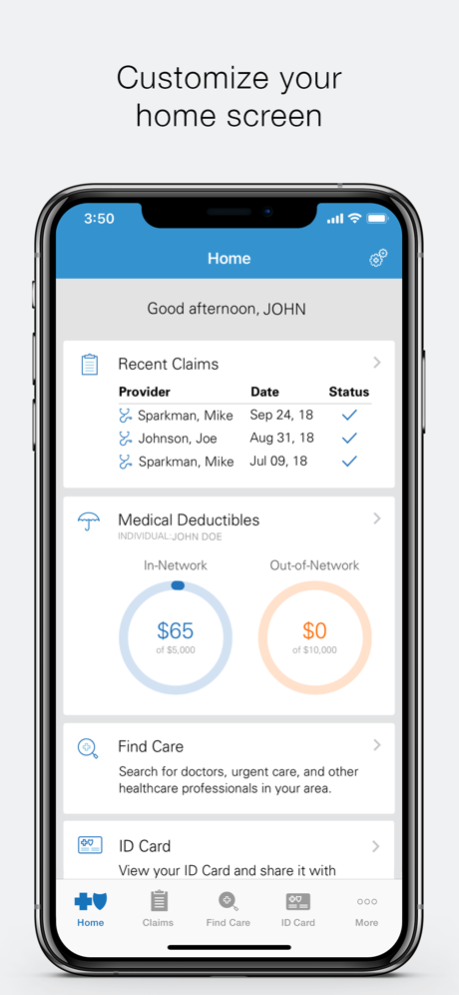


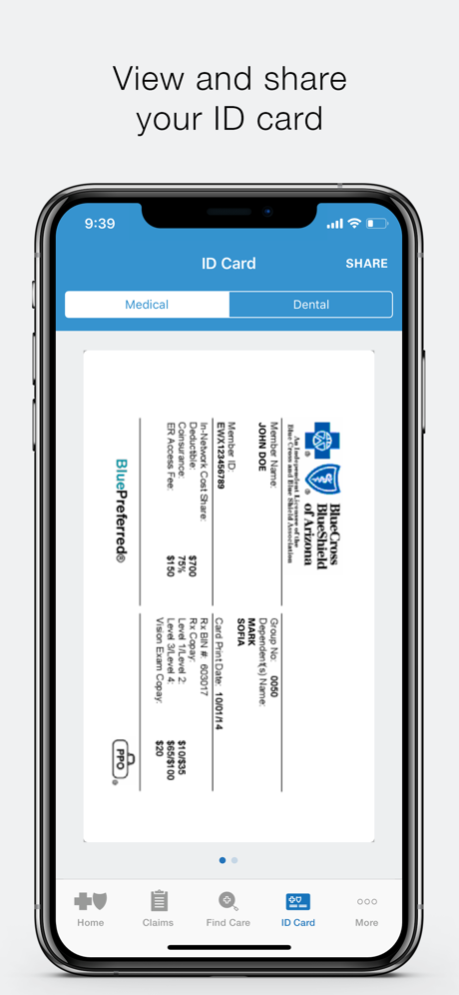
The MyBlue AZ mobile app by Blue Cross Blue Shield of Arizona (BCBSAZ) is designed to help you use and manage your health plan. Whether you’re at the doctor’s office, at work, or out running errands, the app allows you to:
• Access your digital member ID card
• View medical and dental claim information
• Pay your bill (for eligible plans)
• See deductibles and out-of-pocket balances
• Search for doctors, urgent care centers, and other healthcare professionals
• Get cost estimates for procedures and treatment
More Information:
ACCESS YOUR DIGITAL MEMBER ID CARD
Forgot your member ID card? View your ID card and share it with your doctor.
VIEW CLAIM INFORMATION
Check the status of your medical and dental claims and view claim details.
FIND CARE
Search for doctors, urgent care centers, and other healthcare professionals in your plan’s network. You can also get cost estimates for procedures, office visits, surgeries, tests, and vaccines. Learn more about treatment options before you decide where to go.
VIEW YOUR PLAN INFORMATION
Easily access your plan overview, deductible balance, out-of-pocket maximums, and more.
PAY PREMIUMS
If you purchased a plan directly through BCBSAZ or an insurance broker, you can view and pay your monthly premium using your debit card or checking/savings account. You can store your payment card and/or bank account to make paying your monthly payment fast and easy.
CHECK BROKER INFORMATION
If you purchased a plan through an insurance broker, you can access your broker’s name, address, email, and phone number.
CONTACT US
Easily reach a customer service representative or a 24/7 Nurse on Call for healthcare-related questions.
Oct 6, 2023
Version 1.5.1
Implemented landing page directing to new AZBlue Mobile Experience.
About MyBlue AZ
The company that develops MyBlue AZ is Blue Cross Blue Shield of Arizona. The latest version released by its developer is 1.5.1.
To install MyBlue AZ on your iOS device, just click the green Continue To App button above to start the installation process. The app is listed on our website since 2023-10-06 and was downloaded 0 times. We have already checked if the download link is safe, however for your own protection we recommend that you scan the downloaded app with your antivirus. Your antivirus may detect the MyBlue AZ as malware if the download link is broken.
How to install MyBlue AZ on your iOS device:
- Click on the Continue To App button on our website. This will redirect you to the App Store.
- Once the MyBlue AZ is shown in the iTunes listing of your iOS device, you can start its download and installation. Tap on the GET button to the right of the app to start downloading it.
- If you are not logged-in the iOS appstore app, you'll be prompted for your your Apple ID and/or password.
- After MyBlue AZ is downloaded, you'll see an INSTALL button to the right. Tap on it to start the actual installation of the iOS app.
- Once installation is finished you can tap on the OPEN button to start it. Its icon will also be added to your device home screen.
Program Details
System requirements
Download information
Pricing
Version History
version 1.5.1
posted on 2023-10-06
Oct 6, 2023
Version 1.5.1
Implemented landing page directing to new AZBlue Mobile Experience.
version 1.4.27
posted on 2022-12-15
Dec 15, 2022
Version 1.4.27
bug fixes.
version 1.4.19
posted on 2021-09-29
Sep 29, 2021 Version 1.4.19
General Maintenance.
version 1.4.18
posted on 2021-08-23
Aug 23, 2021 Version 1.4.18
General maintenance.
version 1.4.12
posted on 2020-12-31
Dec 31, 2020 Version 1.4.12
Bug fixes and enhancements.
version 1.4.11
posted on 2020-11-24
Nov 24, 2020 Version 1.4.11
General maintenance.
version 1.4.2
posted on 2019-06-28
Jun 28, 2019 Version 1.4.2
Bug fixes
version 1.4.2
posted on 1970-01-01
28 июня 2019 г. Version 1.4.2
Bug fixes
version 1.4.2
posted on 1970-01-01
2019年6月28日 Version 1.4.2
Bug fixes
version 1.4.11
posted on 1970-01-01
٢٤ نوفمبر ٢٠٢٠ Version 1.4.11
General maintenance.
Disclaimer
Official App Store Link
We do not host MyBlue AZ on our servers. We did not scan it for viruses, adware, spyware or other type of malware. This app is hosted by Apple and passed their terms and conditions to be listed there. We recommend caution when installing it.
The App Store link for MyBlue AZ is provided to you by apps112.com without any warranties, representations or guarantees of any kind, so access it at your own risk.
If you have questions regarding this particular app contact the publisher directly. For questions about the functionalities of apps112.com contact us.
